
.Category: Open Door | Type: Employee Guide
What you'll find in this guide:
What exactly is Open Door?
Open Door is an identity-protected channel for you to speak up at any time, about anything. It gives you a safe, digital space to proactively share your thoughts, ideas, or concerns — rather than simply responding to survey questions.
How does it work?
You can access Open Door from within a survey, via email and SMS reminders, or through the employee homepage.
From there, you can give feedback based on the default categories ("problem", "question" or "suggestion") or from your organisation's own bespoke categories. After submission, managers and admins with Open Door access will be able to review your feedback in the dashboard.
How does the confidentiality aspect work?
Imagine Open Door as the modern version of the suggestions box you might find in an office reception; just like that box, when you use Open Door, your name is not attached to anything you submit. That gives you the confidence to feed back problems, questions, suggestions or absolutely anything else without fear of being identified.
If you want to know more, check out our Confidentiality Commitment and our Ultimate Guide to Employee Survey Confidentiality.
Step-by-Step: Submitting feedback:
- Navigate to the Employee Homepage or open the link sent to you by your employer
- Select the Open Door option
- Within the Open Door section, select the relevant category
- Enter your submission into the text box
- 🚩 Before confirming, you'll have the option to share your feedback anonymously on the public Suggestion Board. See more information below.
✅ By giving you the freedom to speak your mind with total confidentiality, Open Door helps your organisation find out what's most important to you right now — and how they can make a real difference — allowing positive change to be driven from the ground up.
Step-by-step: Opting in when submitting feedback
When you submit feedback through Open Door, you will be shown the following option before confirming:
💡 "I'm happy for this suggestion to be shared publicly (anonymously) if an admin approves it."
⚠️ Important: This choice cannot be changed after submitting. You cannot go back and opt in or out once feedback has been sent.
Viewing the public feed
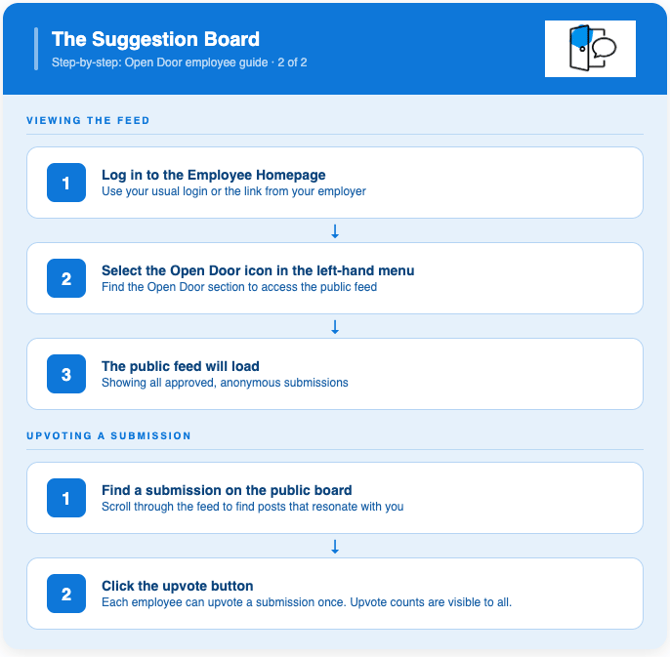
You can access the Suggestion Board via the Employee Homepage:
- Log in to the Employee Homepage
- Select the Open Door icon in the menu
- The public feed will load, showing all approved submissions
Upvoting a submission
You can upvote any submission on the feed to show your support:
- Find a submission on the public board
- Click the upvote button
💡 Each employee can upvote a submission once. Upvote counts are visible to all employees on the feed, and to admins in the Open Door Dashboard.
Troubleshooting
| Issue | Likely cause | Fix |
|---|---|---|
| I can't see the Open Door option on the Employee Homepage | You may have accessed the wrong link, or Open Door hasn't been enabled for your organisation | Check the link sent by your employer or contact your HR/admin team |
| I submitted feedback but want to change my opt-in choice | The opt-in decision cannot be changed after submission | You will need to submit a new piece of feedback with your preferred choice |
| I can't see my submission on the public feed | Your admin may not have approved it yet, or you did not opt in at point of submission | Allow time for admin review — if you didn't opt in, the submission cannot be made public |
| I can't upvote a submission | You may have already upvoted it | Each submission can only be upvoted once per employee |
| The public feed isn't loading | A temporary technical issue | Refresh the page or try again later. If the issue persists, contact your HR/admin team |
🎓 Other Useful Information
Require further technical assistance? Contact Our Support Team